

Tournaments
StepBridge runs tournaments with a tournament director, at fixed times.
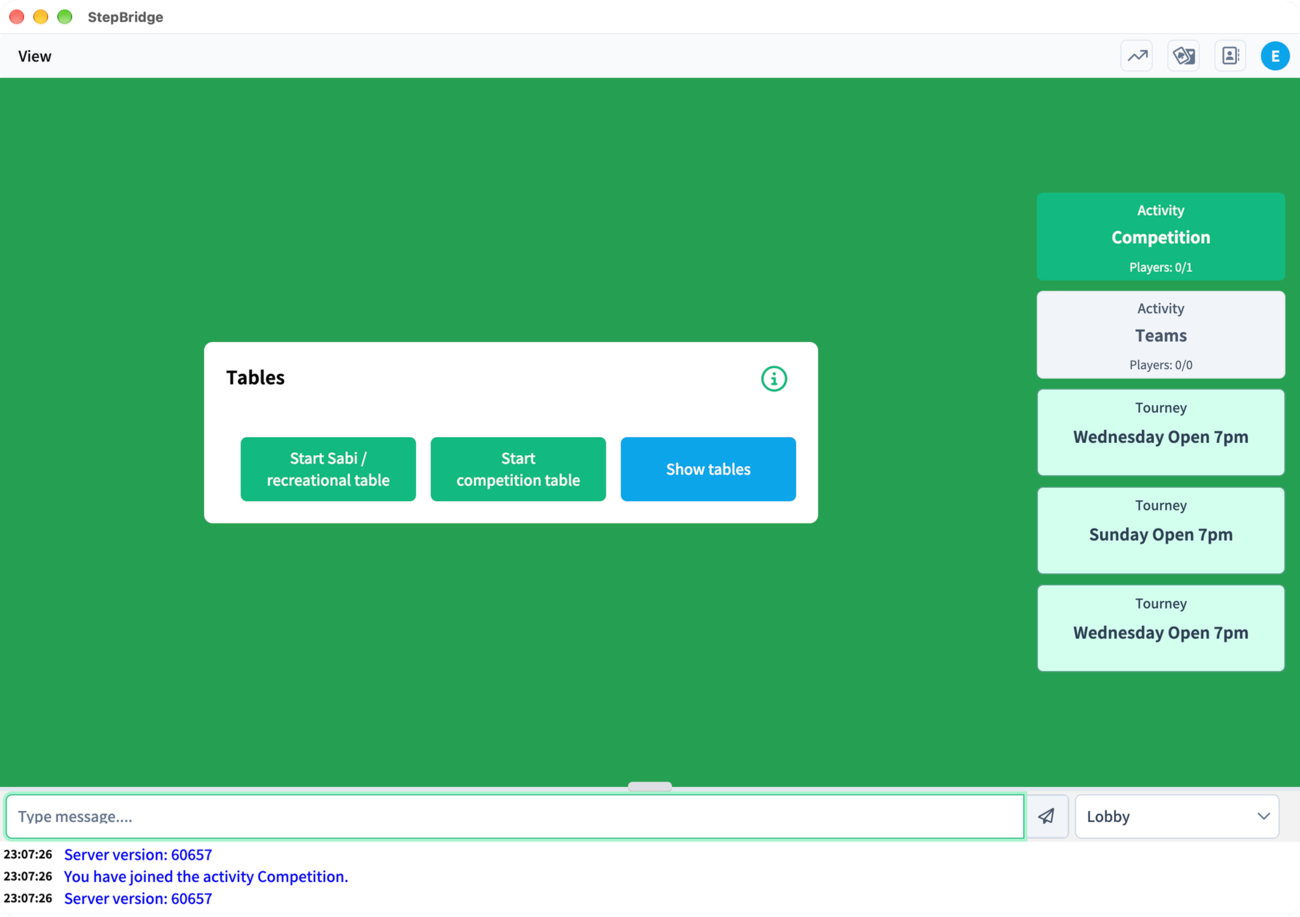
See the events page for the weekly tournament evenings.You find the tournaments in the column of activities on the right of the main screen, together with the competition and teams.
Registering
Click the tournament you want to play in. You then see the tournament's information screen; click Join tournament lobby. The green baize shows how long it is until the start, and whether you have registered.
Click Register
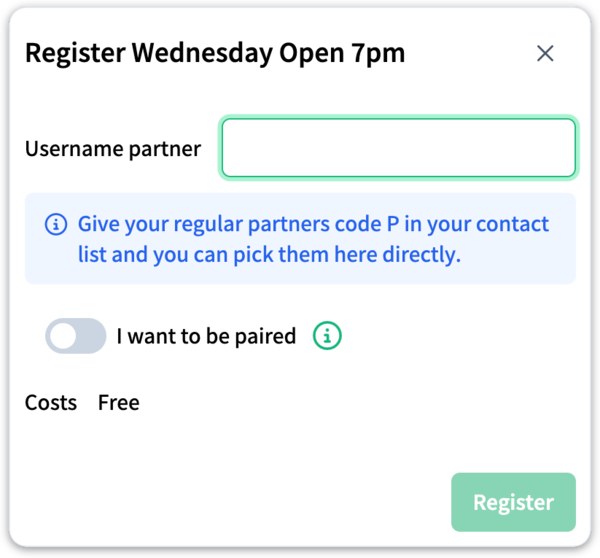
In the tournament lobby, click Register. A window opens.
Enter your partner
Type your partner's username in the Username partner box (capitals don't matter) and click Register. Have you given your regular partners code P in your contacts? Then you can pick them here directly.
Your partner accepts
Your partner now gets an invitation asking whether they want to play with you. Once they click Yes, your registration is complete and you get a confirmation.
Until your partner has accepted, the tournament lobby shows "You registered for this tournament, but your partner … still has to!". To withdraw, click Unregister.
Without a partner
No partner? StepBridge can find one for you. In the registration window, switch on I want to be paired, leave the name box empty and click Register.
Five minutes before the start you are paired with a partner of as similar a level as possible, based on the tournament rating. Make sure you are in the tournament lobby at that moment, or you can't be paired. You won't be paired with a player you have given code X in your contacts. Once you have been paired, you can't undo the pairing.
Costs
Tournaments at StepBridge UK are currently free of charge: the registration window shows Free under Costs.
Tournament types
The name of a tournament usually tells you its type:
- Pairs — the usual type: you play with a fixed partner and are scored on matchpoints.
- IMPs — scored with IMPs (Butler scoring) instead of matchpoints.
- Individual — nobody has a fixed partner; you change partner and opponents every round. This happens automatically.
- Teams — two pairs together form a team. Read how to register under Team tournaments.
The exact format is always shown on the tournament's information screen.
The movement
Most tournaments use a Swiss movement. After each round the standings are calculated and the next round is drawn from them: number 1 plays number 2, number 3 plays number 4, and so on. That way you keep meeting opponents of a similar standard. The draw tries to avoid you meeting the same pair twice; if that isn't possible without upsetting the other pairings, you play the closest pair available.
You don't need to do anything at the start. If you have registered and are in the tournament lobby, the computer takes care of the first draw and all changes of table.
Tournament rating
Pairing you with a partner is based on your tournament rating, comparable to the Elo rating in chess. You see your rating during every tournament.
- You have an individual tournament rating, and a pairs tournament rating with every partner you have played a tournament with. The rating shown is always the one with the partner you registered with.
- The rating is based only on your results in tournament boards.
- For each board we calculate an expected score from the rating difference between you and your opponents. Score better than expected and your rating goes up; the bigger the difference from the expectation, the bigger the effect.
- Every board counts towards your individual rating and towards your rating with your current partner. Once the two of you have played at least 100 boards together, your joint rating applies; until then, the average of your individual ratings.
Results
Straight after the tournament, the message window shows your own result and who finished first to third. You can see the full results, with all the boards and the whole field, in three ways:
- By email — after each tournament you get an email with a link to the results. For most players this is the easiest way.
- In StepBridge — the tournament's information screen has a Results button. During the tournament it shows the current standings, afterwards the final results.
- In the portal — under tournament results you find all tournaments; click a tournament to see its results.
Time and conduct
Each round has a fixed playing time. If you use too much time, the 40%/60% rule may apply. Read how it works under time registration and time exceeded.
Unintended call or play
Clicked the wrong call or card? Call the tournament director straight away. Only the director can allow an undo.
Claiming
Claim when the remaining tricks are certain, and briefly explain how you will take them so your opponents can check the claim. When an opponent claims, check it seriously, and accept it if it is clearly right.
Keep it pleasant
- Make sure your convention card is correct, and agree with your partner which card you are playing.
- Alert your partnership's calls as required; read more about alerting.
- Greet your opponents at the start of a round, and don't assume bad intentions when there is a misunderstanding.
- If you can't sort something out between you, call the tournament director, give them time to look at the situation, and follow their instructions.
You reach the tournament director through the message window.